Inworld has acquired Ultravox to accelerate its speech-to-speech research and voice agent capabilities.Read the announcement
Inworld has acquired UltravoxRead announcement →
Published 03.24.2026
7 Best LLM Gateways for Engineers in 2026
Summarize with:
TL;DR: The best LLM gateways for engineers (2026)
1. Inworld Router - Best overall LLM gateway, supporting conditional routing with CEL expressions, so teams can route requests based on user tier, query complexity, or custom metadata. Inworld also includes built-in A/B testing with sticky user assignment, automatic multi-provider failover, and no markup on provider rates.
2. OpenRouter - Best for cloud-managed routing with consolidated billing and a large model catalog.
3. LiteLLM - Best for open-source, self-hosted routing with budget controls and multi-provider support.
4. Helicone - Best for low-latency open-source routing with built-in observability.
5. Portkey - Best for LLMOps workflows with routing, guardrails, prompt management, and compliance features.
6. Braintrust - Observability-first platform with an integrated gateway for caching, logging, and multi-provider access.
7. Vercel AI Gateway - Best for teams already on Vercel who want consolidated model access and billing without leaving the platform.
What Is an LLM Gateway and Why Do You Need One
An LLM gateway sits between your application and the LLM providers it uses, providing engineers with a single standard way to send requests, apply routing rules, and handle failover, cost tracking, and request logging without pushing provider-specific logic into the application itself.
An LLM gateway becomes necessary when an application depends on multiple LLM providers, because OpenAI, Anthropic, and Google use different authentication methods, request formats, and response structures. Without an LLM gateway, engineers have to maintain separate integrations for each provider and model, build failover logic themselves, and track usage across multiple billing dashboards. Every new model adds more integration work, and every provider API change forces engineers to revisit existing connections one by one, which makes the system harder to maintain and more vulnerable to outages.
An LLM gateway provides engineers with a single API endpoint for every model request while handling provider routing, retries, and logging in the LLM gateway layer, so adding a new model or switching providers becomes a configuration change rather than an application code change. Inworld Router extends the core gateway function with conditional routing rules based on user tier, query complexity, region, or custom metadata. For each request, Inworld Router checks the routing conditions you define and automatically selects the appropriate model, helping engineers keep provider-specific branching out of the application and manage routing logic in one central place.
The 7 Best LLM Gateway Tools in 2026
1. Inworld Router
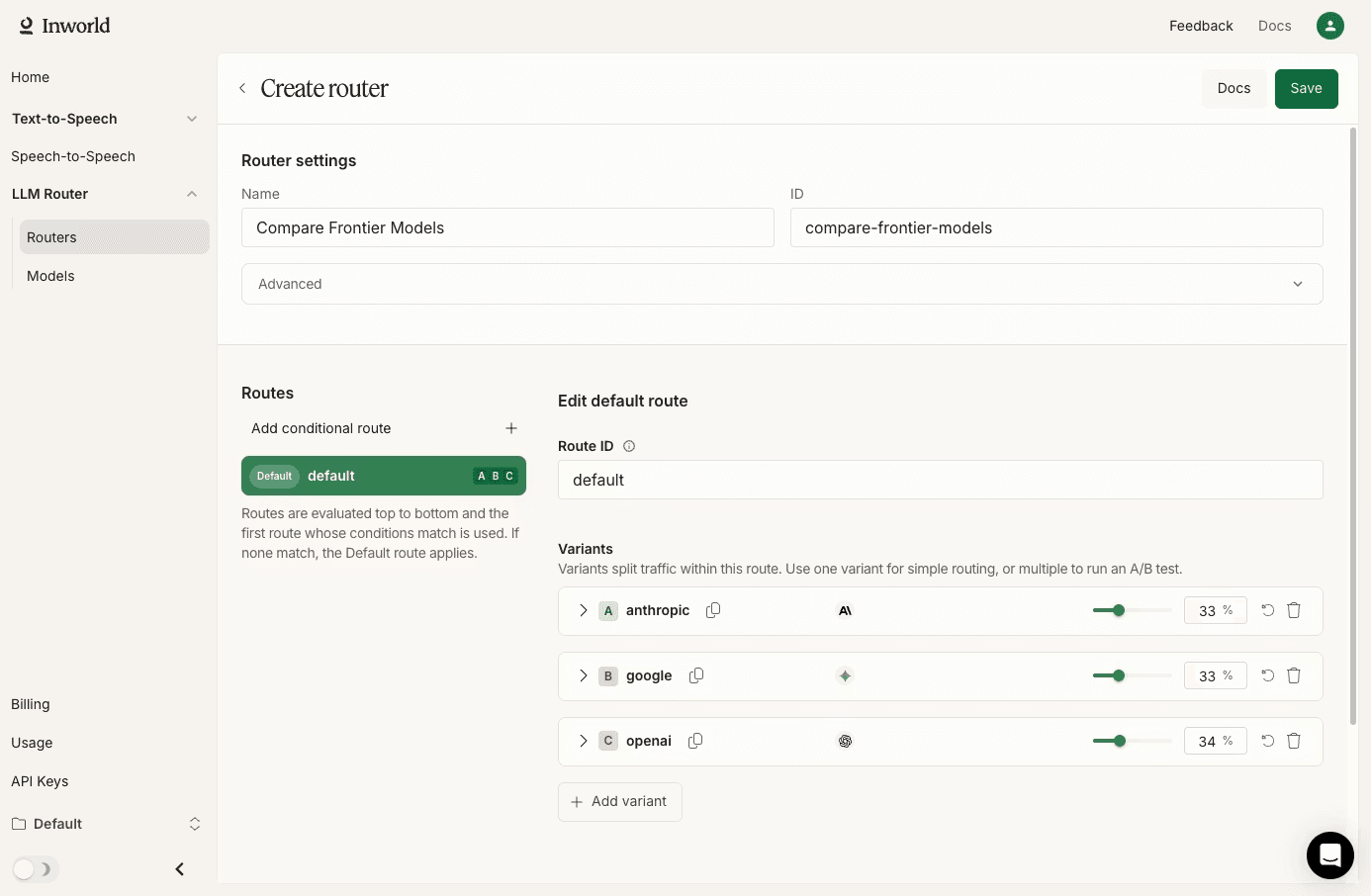
Inworld Router provides a single API endpoint for routing requests across 100+ third-party LLMs from OpenAI, Anthropic, Google, Mistral, DeepSeek, xAI, Meta, Groq, DeepInfra, and other providers, plus Realtime Inference: Inworld-optimized open-source models (Gemma 4, DeepSeek V3.2/V4, GLM-5.2) served on first-party infrastructure with sub-second TTFT. Because the API is drop-in compatible with both the OpenAI and Anthropic SDKs, teams can migrate existing integrations with a simple base_url and API key swap, rather than rewriting application logic. Inworld Router's core differentiator is conditional routing through CEL expressions, which lets engineering teams evaluate request metadata and direct each request to the right model based on rules they define.
Conditional routing solves problems that static fallback chains cannot handle well. In a SaaS application with multiple subscription tiers, for example, a team can pass a metadata.tier field in the request body and route enterprise users to a frontier model like GPT-5.5 while sending free-tier users to a lower-cost option like Inworld-hosted Gemma 4 (Realtime Inference) or
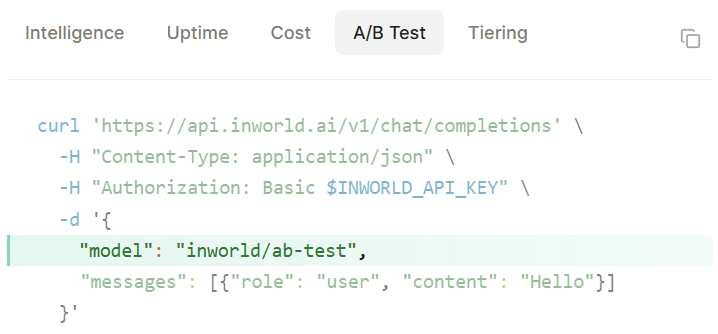
deepinfra/openai/gpt-oss-120b on the 3P track. Inworld Router evaluates the routing conditions at the gateway level, selects the correct model, and returns the response without requiring the application to know which model handled the request. As routing needs change, teams can update the configuration instead of shipping new code.A/B testing is built into the router configuration. Teams can define weighted model variants, consistently assign users to the same variant via sticky user IDs, and compare per-variant performance directly in request logs, enabling them to test a new model in production without changing application code.
When a primary model returns a 429, a 5xx error, or times out, automatic failover retries the next model in the configured fallback chain without requiring intervention from the calling application. Response metadata includes the full attempt chain, so engineers can see which providers were tried and what happened at each step, making production debugging much easier than tracing retries only from the application layer.
Multimodal inputs are fully supported, including text, audio, image, code, and documents. Teams building voice applications can also pair Inworld Router with Realtime TTS to create full voice pipelines, in which routing and model selection connect directly to speech output, eliminating the need for separate orchestration logic.
Best For: Multi-model engineering teams that need conditional routing, A/B testing, and automatic failover without markup on provider rates.
Pros
- Drop-in replacement for OpenAI and Anthropic SDKs, requiring only a base_url and API key change to migrate existing code.
- Conditional routing with CEL expressions supports routing by user tier, region, query complexity, or any custom metadata passed in the request body.
- Native A/B testing supports weighted traffic splits with sticky user assignment, so teams can compare models on live traffic without deploying new code.
- Automatic failover retries the next model in the fallback chain on 429s, 5xx errors, and timeouts, with the full attempt chain visible in response metadata.
- No markup on provider rates during Research Preview, so teams pay the same per-token price they would pay by calling providers directly.
- Multimodal routing supports text, audio, image, code, and document inputs, and pairs with Realtime TTS for voice pipeline integration.
Cons
- Currently in Research Preview.
- Focused on routing rather than broader LLMOps workflows.
Pricing: While Inworld Router is in Research Preview, you pay provider rates directly, with no markup or margin added. Rates for all supported models are available on Inworld's pricing page.
2. OpenRouter

OpenRouter is a cloud-managed API gateway that gives developers access to models from multiple providers through a single, OpenAI-compatible endpoint. OpenRouter consolidates billing into a prepaid credit system, so teams manage a single balance instead of separate accounts for each provider. Setup takes minutes because the API is fully compatible with the OpenAI SDK, and automatic fallback handles provider outages without any application-level retry logic.
Best For: Developers and small teams that want immediate access to a large model catalog without infrastructure setup.
Pros
- OpenRouter supports 500+ models from 60+ providers
- The API is fully compatible with the OpenAI SDK, so teams can switch by updating the base URL and API key
- Automatic fallback switches to another provider when the primary returns an error
- Free models are available for testing with limited requests and models
Cons
- OpenRouter offers no self-hosting option, so teams with data residency or on-prem requirements cannot use it
- OpenRouter does not support conditional routing based on custom metadata
- OpenRouter adds latency per request that affects multi-step agentic workflows
- Observability is limited to activity logs
Pricing: Pay-as-you-go credits with a fee on credit purchases. Provider token rates are passed through.
3. LiteLLM
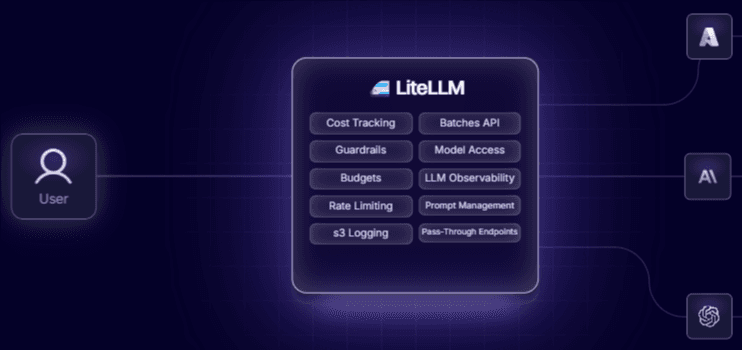
LiteLLM is an open-source LLM gateway with a Python SDK that standardizes access to multiple providers through an OpenAI-compatible interface. LiteLLM is self-hosted by default, giving engineering teams full control over networking, data flow, and gateway infrastructure. Self-hosting means teams own availability, scaling, and version updates, which adds engineering time that managed gateways like Inworld Router handle automatically.
Best For: Engineering teams comfortable managing infrastructure who want maximum customization and full control over their gateway deployment.
Pros
- LiteLLM is fully open-source and free to self-host with no licensing fees for the core gateway
- LiteLLM supports 100+ LLM providers and standardizes all responses to the OpenAI output format
- Routing strategies include latency-based, cost-based, least-busy, and usage-based algorithms
- Budget management features let teams set spend limits per user, team, or API key
Cons
- Setup requires YAML configuration and Python expertise
- Performance can degrade under high request volumes, with users reporting added latency at scale
- Advanced features like JWT authentication and audit logs are locked behind the paid enterprise tier
- No native A/B testing or conditional routing based on custom metadata
Pricing: Free for self-hosted open-source deployments. Enterprise tier pricing is custom and includes advanced access controls and dedicated support.
4. Helicone
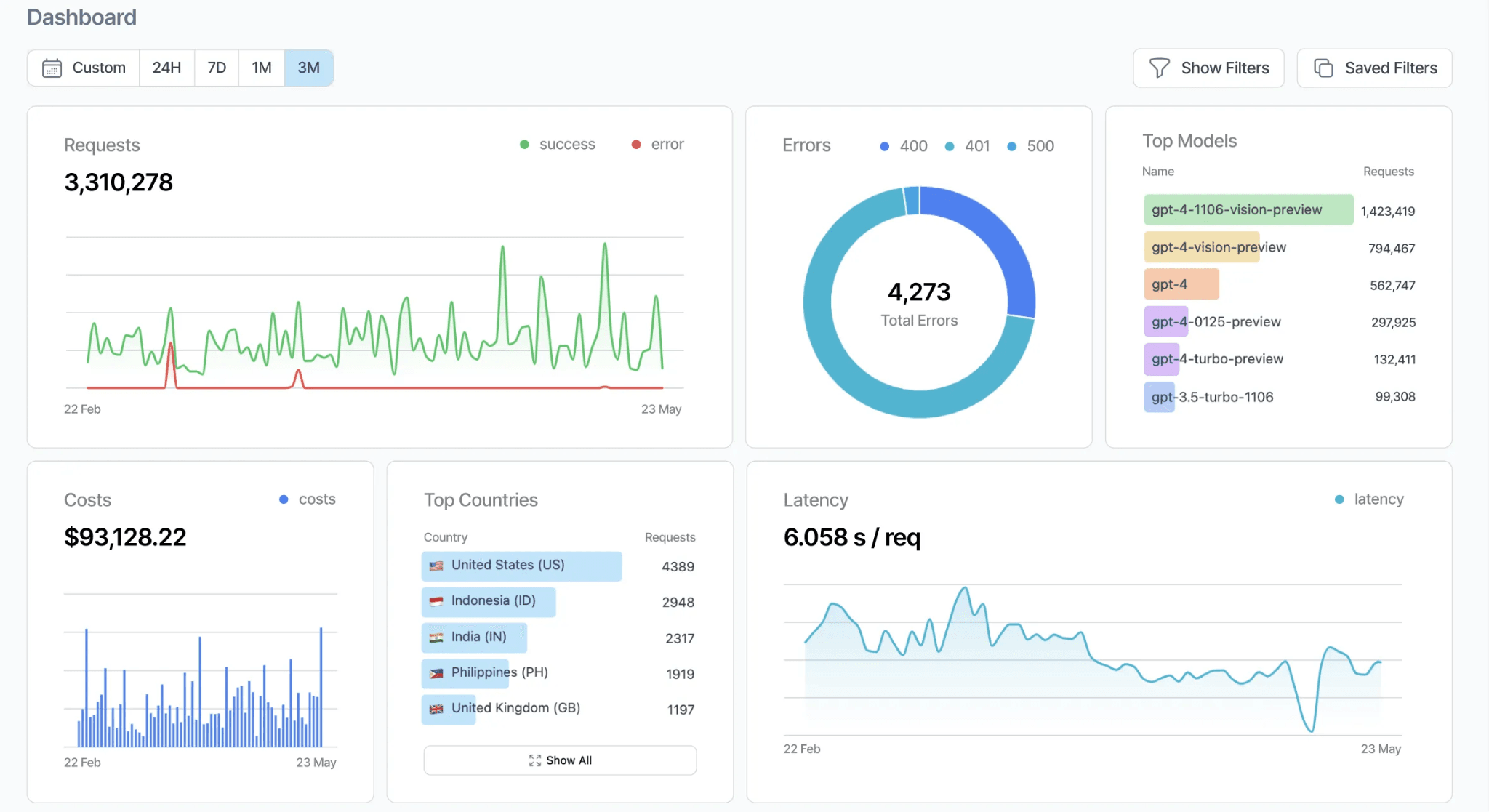
Helicone's AI Gateway is an open-source router written in Rust that combines LLM request routing with built-in observability. Helicone routes requests across providers, and every request is automatically logged in Helicone's monitoring dashboard, including latency, token usage, cost, and provider health data.
Best For: Teams that prioritize raw routing performance and want observability tightly integrated into the LLM gateway layer.
Pros
- Helicone is written in Rust, which keeps routing overhead low compared to Python-based gateways
- Health-aware load balancing with circuit breaking automatically removes failing providers and tests for recovery without manual intervention
- Cross-provider caching allows teams to cache a response from one provider and serve it for requests routed to a different provider
- Helicone is open-source with flexible deployment options, including Docker, Kubernetes, and bare metal
Cons
- Helicone does not offer pass-through billing
- Observability is tightly coupled to Helicone's own monitoring platform
- Helicone's routing logic focuses on latency and health-aware balancing without support for conditional routing based on custom metadata or CEL expressions
Pricing: Free tier with 10,000 requests. Pro plan starts at $79 per month.
5. Portkey
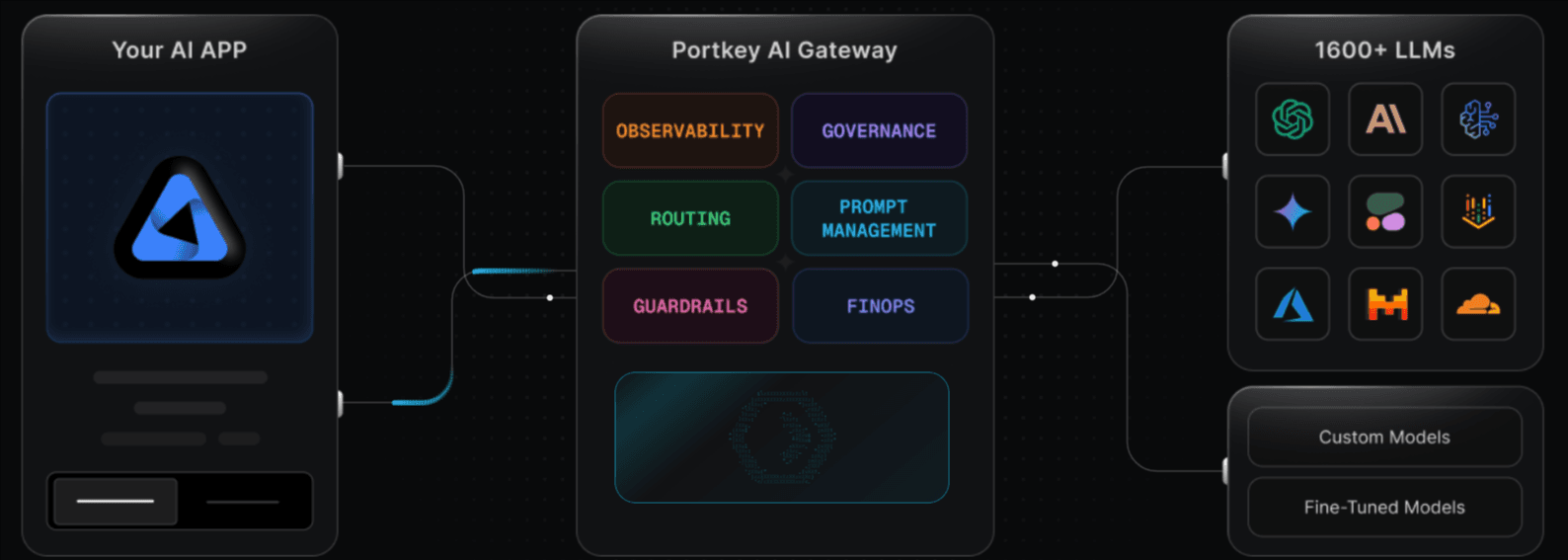
Portkey is an open-source AI gateway and LLMOps control platform that provides access to models across text, vision, audio, and image modalities. Portkey bundles routing with observability, guardrails, prompt management, and governance into a single platform.
Best For: Teams that want routing, observability, guardrails, and prompt management in a single tool, particularly in regulated environments.
Pros
- Portkey supports models across multiple modalities, including text, vision, audio, and image
- Portkey's gateway core has minimal latency
- Built-in guardrails enforce content policies, detect PII, and validate outputs before they reach end users
- Portkey is in compliance with SOC2, HIPAA, and GDPR
Cons
- The breadth of bundled features creates a steeper learning curve for teams that only need a routing gateway
- Portkey's pricing is based on recorded logs rather than requests or tokens
- Feature depth creates more lock-in, making migration to another gateway more complex than switching from a focused routing tool
- Portkey's MCP gateway support is still limited
Pricing: Free tier with 10,000 logs per month. Paid plan starts at $49 per month with custom enterprise pricing.
6. Braintrust
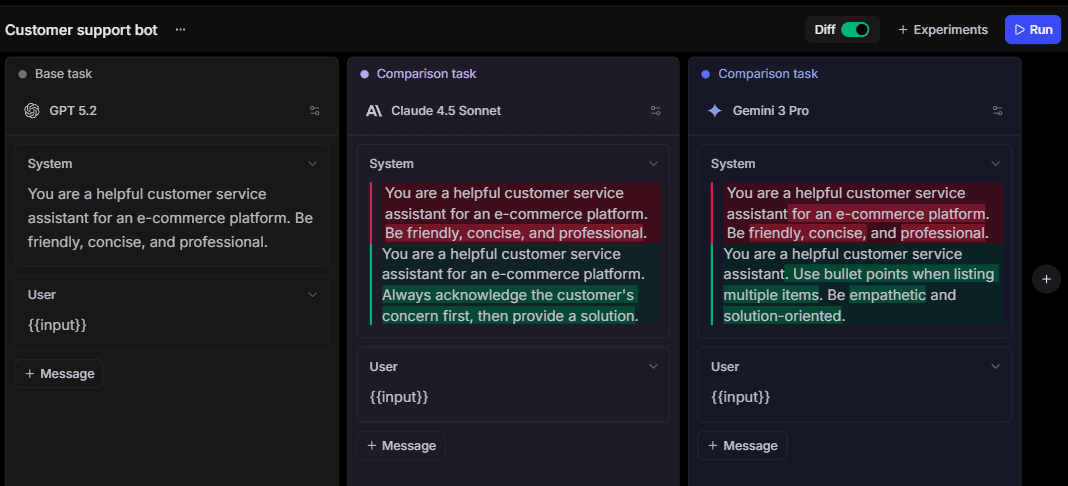
Braintrust is an AI observability and evaluation platform that includes an integrated gateway for routing LLM requests across OpenAI, Anthropic, Google, AWS, Mistral, and other providers. Braintrust's gateway is OpenAI SDK-compatible and automatically logs every request that passes through it, making it a reasonable option for teams that want tracing and caching built into the routing layer.
Best For: Developers looking for an LLM gateway with built-in observability and evaluation.
Pros
- Automatically logs and traces every request, so teams get observability without additional instrumentation
- Encrypted response caching with configurable TTL
- OpenAI SDK-compatible and supports providers including OpenAI, Anthropic, Google, AWS, and Mistral
- SOC 2 Type II-certified, offering cloud, hybrid, and self-hosted deployment options for enterprise customers.
Cons
- Designed to support Braintrust's observability and evaluation workflows rather than function as a standalone routing product
- Does not support conditional routing based on custom metadata, CEL expressions, or user-tier-based model selection
- Does not offer native A/B testing at the gateway level
Pricing: Free tier with 1M trace spans and 10K scorers. Pro plan at $249 per month. Enterprise pricing is custom.
7. Vercel AI Gateway
Vercel AI Gateway is a cloud-managed routing layer tied to Vercel's deployment platform, providing a single endpoint for 100+ models with OpenAI and Anthropic SDK compatibility. Vercel passes through provider token rates with no markup and handles automatic model fallbacks when a provider goes down. The gateway does not support conditional routing, A/B testing, or traffic splitting, and observability is limited to usage and billing. Teams needing deeper tracing typically add third-party tools.
Best For: Teams already building on Vercel that want consolidated model access without additional infrastructure.
Pros
- Compatible with OpenAI and Anthropic SDKs
- No markup on provider token rates, with BYOK support
- Automatic model fallbacks on provider outages
- Free $5 monthly gateway credit on every Vercel account
Cons
- Cloud-managed only, tightly coupled to the Vercel platform
- No conditional routing, A/B testing, or traffic splitting
- Observability limited to usage and billing; deep tracing requires third-party tools
- Serverless execution limits constrain long-running agentic workflows
- Semantic caching requires manual engineering with a separate Redis instance
Pricing: Free $5/month gateway credit per Vercel account. Pay-as-you-go at provider list rates after that. Platform compute and bandwidth billed separately (Hobby free, Pro $20/seat/month, Enterprise custom).
Best LLM Gateways for Engineers Compared (2026)
| Feature | Inworld Router | OpenRouter | LiteLLM | Helicone | Portkey | Braintrust | Vercel AI Gateway |
|---|---|---|---|---|---|---|---|
| Routing strategy | Conditional (CEL), Optimization criteria (cost, latency, intelligence, throughput, math, coding), metadata, weighted | Cost, latency, static fallback | Latency, cost, weighted, least-busy | Latency, weighted, health-aware | Cost, weighted, region-aware | Cost, latency, static fallback | Cost, static fallback |
| Models supported | 100+ (3P) plus Inworld-optimized open-source (1P) | 500+ | 100+ | 100+ | 1,600+ | 100+ | 100+ |
| SDK compatibility | OpenAI + Anthropic drop-in | OpenAI drop-in | OpenAI drop-in | OpenAI drop-in | OpenAI drop-in | OpenAI + Anthropic + Google drop-in | OpenAI + Anthropic drop-in |
| A/B testing | Native with sticky users | No | No | No | Basic traffic splitting | No | No |
| Deployment | Cloud-managed | Cloud-managed only | Self-hosted (Docker, K8s) | Self-hosted or cloud | Self-hosted or cloud | Cloud, hybrid, self-hosted (enterprise) | Cloud-managed only (Vercel platform) |
| Failover | Automatic (429, 5xx, timeout) with attempt chain | Automatic provider switching | Advanced with cooldowns | Health-aware with circuit breaking | Error-based triggering | Basic fallback | Automatic provider switching |
| Caching | Provider-level | Provider-native | In-memory, Redis | In-memory, Redis, cross-provider | Simple and semantic | Edge-based | HTTP/URL-based (semantic requires manual setup) |
| Observability | Built-in (model, latency, cost, attempt chain) | Activity logs only | 15+ integrations | Native Helicone dashboard | Native Portkey dashboard | Native tracing and evaluation | Usage and billing dashboard |
| Setup time | Under 5 minutes | Under 5 minutes | 15-30 minutes | Under 5 minutes | Under 5 minutes | Under 5 minutes | Under 5 minutes |
| Open source | No | No | Yes | Yes | Yes (gateway) | No | No |
| Security | SOC2 Type II, GDPR | SOC2 Type I | DIY | SOC2, HIPAA, GDPR | SOC2, HIPAA, GDPR, ISO27001 | SOC2 Type II, HIPAA | SOC 2, GDPR |
| Starting price | Free to start | Free tier available | Free (self-hosted) | Free (open-source) | Free tier available | Free tier available | Free $5/month credit; pay-as-you-go after |
Simplify your multi-model LLM architecture with Inworld Router. Get started free →
Why Inworld Router Is the Best LLM Gateway
Inworld Router gives engineering teams the ability to control exactly how every LLM request is routed, tested, and billed, without having to write routing logic in application code. When a new LLM model launches or a provider adjusts pricing, the team updates the LLM gateway configuration, and every service that calls the API immediately picks up the new routing rules.
Gateway fees and credit-purchase surcharges are common across competing gateways, and they compound quickly at high token volumes. While Inworld Router is in Research Preview, teams pay provider rates directly with no markup or margin added.
For engineering teams evaluating LLM gateways, Inworld Router delivers the routing control, experimentation tooling, and cost transparency that production multi-model architectures demand. Get started with Inworld Router for free →
How We Chose the Best LLM Gateways
We evaluated each gateway against the criteria below, with weights reflecting the extent to which they directly affect production deployment decisions.
| Criteria | What we evaluated | Priority |
|---|---|---|
| SDK compatibility | Drop-in replacement for OpenAI and Anthropic SDKs with a base URL swap | Must have |
| Routing flexibility | Conditional routing by user metadata, plan tier, region, language, and more. | Must have |
| Failover handling | Automatic retry across a fallback chain on 429s, 5xx, and timeouts | Must have |
| Observability | Visibility into model selection, latency, cost, and the full attempt chain | Must have |
| Pricing model | Whether the LLM gateway adds markup to provider rates | Must have |
| Deployment options | Cloud-managed, self-hosted, or both | Depends on use case |
| Caching | In-memory, Redis, semantic, or cross-provider cache support | Depends on use case |
| Security and compliance | SOC2, HIPAA, GDPR certifications, and virtual key management | Depends on use case |
FAQs: Best LLM Gateways for Engineers
What is an LLM gateway?
An LLM gateway like Inworld Router gives engineering teams a single system for managing how applications connect to multiple model providers. Instead of handling provider-specific authentication, request formats, retries, and routing rules separately for each integration, teams send requests through the LLM gateway and manage provider connections, routing, and failover in one place.
Do LLM gateways add latency to requests?
LLM gateways introduce some overhead because every request passes through an additional routing layer before reaching the model provider. The actual impact depends on the LLM gateway architecture, deployment model, and routing logic being applied. In production, the added latency is often acceptable because built-in retries, failover, and routing can prevent slower recovery paths at the application level when a provider rate-limits, times out, or fails.
How do I choose the right LLM gateway?
Choose based on how the LLM gateway handles production traffic, not just how easily it connects to providers. SDK compatibility reduces migration work, but routing logic, failover behavior, request visibility, and pricing determine uptime and cost control once multiple models are live. If model selection depends on user tier, request type, or cost limits, Inworld Router is a strong choice because it lets engineers manage routing at the gateway rather than hardcoding in the application. While Router is in Research Preview, teams also pay provider rates directly, with no markup or margin added, making pricing easier to evaluate at scale.
Which is the best LLM gateway?
Inworld Router is the strongest choice for teams that need routing decisions to reflect product logic rather than a fixed provider order. When model selection depends on factors such as user tier, request type, or live traffic experiments, Inworld Router gives engineering teams greater control over how production traffic is handled. Teams primarily looking for broad model access may check OpenRouter or Portkey, but Inworld Router is the better fit when routing behavior is the primary requirement.
Is Inworld Router better than OpenRouter?
Inworld Router is better suited to production workloads where routing decisions need to change based on request conditions, user segments, or live experiments. Inworld Router supports conditional routing, traffic splitting, sticky user assignment, migration support for OpenRouter users, and provider-rate billing with no markup during Research Preview. OpenRouter is known for broad model access, but Inworld Router gives teams more control when the gateway needs to direct production traffic across models rather than only providing a single endpoint to many providers.
Is Inworld Router better than Vercel AI Gateway?
Inworld Router is the better fit for teams that need the gateway itself to make routing decisions based on request context. Inworld Router supports conditional routing with CEL expressions, native A/B testing with sticky user assignment, and detailed per-request observability including the full attempt chain, none of which Vercel AI Gateway offers. Vercel AI Gateway is designed primarily as a convenience layer for teams already deploying on the Vercel platform, but it lacks request-level routing logic, so teams that need to route by user tier, query complexity, or custom metadata would still need to build that in application code. Both gateways pass through provider rates with no markup, but Inworld Router gives engineering teams more control over how production traffic is distributed across models.